Showing posts with label C#. Show all posts

Tuesday, October 18, 2011

Using multiple authentication modes in a single ASP.NET application


Summary
ASP.NET only allows a single authentication mode to be configured for each application. Some applications may require different modes for different paths. For example, if an application uses Forms authentication for users of the public site, and Windows authentication for users of the administration site.
Resolution
One solution is to create two separate applications; one for the public site using Forms authentication, and one for the administration site using Windows authentication. However, this will mean that resources in the public application cannot be accessed from the administration application using app-relative paths (e.g. /images/logo.jpg).
A better solution is to use the global.asax file to handle theFormsAuthentication_OnAuthenticate event, and apply Windows authentication where appropriate.
  1. In IIS, open the properties of the administration folder;
     
  2. Under "Directory Security", edit the anonymous access and authentication settings, and disable anonymous access;
     
  3. Edit the web.config file, and configure the application to use Forms authentication;
     
  4. Add the following code to the global.asax file in the root of the application:


<%@ Application Language="C#" %>
<%@ Import Namespace="System.Security.Principal" %>
<%@ Import Namespace="System.Web" %>
<%@ Import Namespace="System.Web.Security" %>
 
<script runat="server">
 
public void FormsAuthentication_OnAuthenticate(object sender, FormsAuthenticationEventArgs e)
{
    if (null == e) throw new ArgumentNullException("e");
     
    // Check that we have a Windows user
    WindowsIdentity winUser = e.Context.Request.LogonUserIdentity;
    if (null == winUser) return;
     
    // Check that the path allows Windows authentication
    string path = VirtualPathUtility.ToAppRelative(e.Context.Request.Path);
    if (!IsWindowsAuthenticated(path, e.Context)) return;
     
    // Don't allow guest accounts to access
    if (winUser.IsAnonymous || winUser.IsGuest || winUser.IsSystem) return;
     
    WindowsPrincipal winPrincipal = new WindowsPrincipal(winUser);
    if (winPrincipal.IsInRole("Guests")) return;
     
    e.User = winPrincipal;
}
 
private static bool IsWindowsAuthenticated(string path, HttpContext context)
{
    if (string.IsNullOrEmpty(path)) throw new ArgumentNullException("path");
    if (null == context) throw new ArgumentNullException("context");
     
    // Check that the path starts with the restricted folder:
    if (path.StartsWith("/restricted/", StringComparison.OrdinalIgnoreCase)) return true;
     
    return false;
}
 
</script>


      5. Requests to the administration folder will now use Windows authentication; the rest of the site will continue to use Forms authentication

Wednesday, October 12, 2011

Export Import Excel Data into Sql Server Using SqlBulkCopy-ASP.NET


Export Import Excel Data into Sql Server Using SqlBulkCopy-ASP.NET

In this example i am going to describe how to Import or insert data into Sql server from Excel spreadsheet using sqlbulkcopy method.

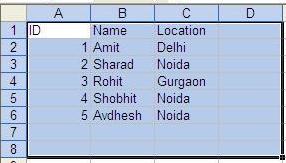
First of all create a Excel workbook as shown in image below and insert some data into it.


Now write this code to insert data into SQL table
public partial class _Default : System.Web.UI.Page
{
string strConnection = ConfigurationManager.ConnectionStrings
["ConnectionString"].ConnectionString;
protected void Page_Load(object sender, EventArgs e)
{

}
protected void Button1_Click(object sender, EventArgs e)
{
//Create connection string to Excel work book
string excelConnectionString =
@"Provider=Microsoft.Jet.OLEDB.4.0;
Data Source=C:\Details.xls;
Extended Properties=""Excel 8.0;HDR=YES;""";

//Create Connection to Excel work book
OleDbConnection excelConnection =
new OleDbConnection(excelConnectionString);

//Create OleDbCommand to fetch data from Excel
OleDbCommand cmd = new OleDbCommand
("Select [ID],[Name],[Location] from [Detail$]",
excelConnection);

excelConnection.Open();
OleDbDataReader dReader;
dReader = cmd.ExecuteReader();

SqlBulkCopy sqlBulk = new SqlBulkCopy(strConnection);
sqlBulk.DestinationTableName = "Details";
//sqlBulk.ColumnMappings.Add("ID", "ID");
//sqlBulk.ColumnMappings.Add("Name", "Name");
sqlBulk.WriteToServer(dReader);
}
}

If there are more columns in your database table or excel workbook and you want to insert data in some of them than you need to add ColumnMappings like this
sqlBulk.ColumnMappings.Add("ID", "ID");
sqlBulk.ColumnMappings.Add("Name", "Name");


End result will be like this


Hope this helps

Thursday, September 29, 2011

WCF vs Web service


WCF is a programming model and API. "WCF Service" implies an app that uses such programming model.
"Web Service" is an app that exposes an HTTP (REST (XML or JSON), SOAP or otherwise) interface.
You can build a Web service using WCF, but you can also build a Web service using other APIs or "stacks". Like PHP or Java, for example.
With WCF you can build web services but you can also build services that are not, "Webbish". For example you can build a service that accepts incoming binary requests over only a local pipe interface. It is still a service, but it is not a "web service" because it is not using web protocols (generally HTTP and XML).

Friday, August 5, 2011

Avoid DataBinder.Eval in ASP.NET and improve Performance


I see a lot of developers using DataBinder.Eval, which evaluates data-binding expressions at run time. Although the DataBinder.Eval is quite frequently used in web controls like the GridView, Repeater etc, use it with caution. Here’s what the documentation says

Because this method performs late-bound evaluation, using reflection at run time, it can cause performance to noticeably slow compared to standard ASP.NET data-binding syntax.
Let’s take an example to see how to avoid using DataBinder.Eval. Here’s some code that uses DataBinder.Eval() to display Person details


Although the markup looks tidy, for a large number of rows and columns, you are executing Eval() that many times, which will reduce performance since DataBinder.Eval() uses reflection to evaluate the data-binding expressions.
To avoid using DataBinder.Eval you can use the following alternatives:
For ObjectDataSource
If you are using an ObjectDataSource, refer directly to the Person class as shown below:
<asp:Repeater ID="rptPerson" runat="server">
    <ItemTemplate>
 <%# ((Person)Container.DataItem).FirstName %> 
<%# ((Person)Container.DataItem).LastName  %> 
<%# ((Person)Container.DataItem).Age  %>     
    </ItemTemplate>
</asp:Repeater>
For SqlDataSource
If you are using a SQLDataSource with a DataTable, use the following markup to cast the Container.DataItem as a DataRowView
<asp:Repeater ID="rptPerson" runat="server">
    <ItemTemplate>
        <%# ((DataRowView)Container.DataItem)["FirstName"] %> 
<%# ((DataRowView)Container.DataItem)["LastName"]%> 
<%# ((DataRowView)Container.DataItem)["Age"]%> 
</ItemTemplate>
</asp:Repeater>
Note: If you are using SqlDataSource with the DataReader mode, use DbDataRecord.

Tuesday, July 12, 2011

Customizable Password Policy C#

Introduction
To enforce password strength in such a way that user can configure the number of uppercase, lowercase, special characters and digits the password can contain. 

Background
One of my projects, there arises a scenario in which the password strength is configure in the database. Have to make use of this database configuration to validate the password entered by the user. So I needed a class which can enforce this and should be highly customizable.

Using the code
Password Policy contains a method IsValid which takes password string as its parameter and checks for various conditions like minimum lenth of the password, the number of uppercase or lowercase the password can contain. The user can also customize the no of digits and non-alpha numeric characters also.
It does all the Counts throug the Regex.Matches function which retuns the number of occurances of the pattern.


public class PasswordPolicy
    {
        private static int Minimum_Length = 7;
        private static int Upper_Case_length = 1;
        private static int Lower_Case_length = 1;
        private static int NonAlpha_length = 1;
        private static int Numeric_length = 1;
 
        public static bool IsValid(string Password)  
        {
            if (Password.Length < Minimum_Length)
                 return false;               
             if (UpperCaseCount(Password) < Upper_Case_length)
                 return false;
             if (LowerCaseCount(Password) < Lower_Case_length)
                 return false;
             if (NumericCount(Password) < 1)
                 return false;
             if (NonAlphaCount(Password) < NonAlpha_length)
                 return false;
             return true;  
         }
 
        private static int UpperCaseCount(string Password)
        {
            return Regex.Matches(Password, "[A-Z]").Count;
        }
 
        private static int LowerCaseCount(string Password)
        {
            return Regex.Matches(Password, "[a-z]").Count;
        }
        private static int NumericCount(string Password)
        {
            return Regex.Matches(Password, "[0-9]").Count;
        }
        private static int NonAlphaCount(string Password)
        {
            return Regex.Matches(Password, @"[^0-9a-zA-Z\._]").Count;
        }
    }

Sunday, June 26, 2011

Bulk Insert using GridView and Sql Server XML


Download source and store procedure script from here.


private void InsertEmptyRow()
{
DataTable dt = new DataTable();
DataRow dr = null;


dt.Columns.Add(new DataColumn("CustName", typeof(string)));
dt.Columns.Add(new DataColumn("CustPosition", typeof(string)));
dt.Columns.Add(new DataColumn("CustCity", typeof(string)));
dt.Columns.Add(new DataColumn("CustState", typeof(string)));


for (int i = 0; i < 5; i++)
     {
          dr = dt.NewRow(); dr["CustName"] = string.Empty;
          dr["CustPosition"] = string.Empty;
          dr["CustCity"] = string.Empty;
          dr["CustState"] = string.Empty; dt.Rows.Add(dr);
    }
   gvCustomer.DataSource = dt; gvCustomer.DataBind();
}


 As, you see above code I am creating five empty rows initially which is empty. This method I am calling at page load event. Note :- I am creating only five empty rows, you can create as much required for your bulk insert according to your requirement And one more difference between, Bulk update and bulk insert is that as we fetch all records for bulk update, so we don’t have empty rows, but in insert we have five empty rows. One more thing, Suppose we insert three rows and two rows empty what would happen ?. For that I am checking if name field is empty or not, else don’t insert.

 StringBuilder sb = new StringBuilder(); sb.Append("");
for (int i = 0; i < gvCustomer.Rows.Count; i++) 

      { 
      TextBox txtName = gvCustomer.Rows[i].FindControl("txtName") as TextBox; 
      TextBox txtPosition = gvCustomer.Rows[i].FindControl("txtPosition") as TextBox; 
      TextBox txtCity = gvCustomer.Rows[i].FindControl("txtCity") as TextBox;
      TextBox txtState = gvCustomer.Rows[i].FindControl("txtState") as TextBox;
      if(txtName.Text.Length != 0)
           sb.Append("");
}
sb.Append("
");


As you see, I am checking txtName if length is more then zero then insert record else skip it. As other insert detail is simple.


string conStr = WebConfigurationManager.ConnectionStrings["BlogConnectionString"].ConnectionString;
SqlConnection con = new SqlConnection(conStr);
SqlCommand cmd = new SqlCommand("InsertCustomer", con);
cmd.CommandType = CommandType.StoredProcedure;
cmd.Parameters.AddWithValue("@XMLCustomer", sb.ToString());


try
{
using (con)
{
con.Open();
cmd.ExecuteNonQuery();
}

lblError.Text = "Record(s) Inserted successfully";
lblError.ForeColor = System.Drawing.Color.Green;
}
catch (Exception ex)
{
lblError.Text = "Error Occured";
lblError.ForeColor = System.Drawing.Color.Red;
}


Store procedure also simple, just direct insert from XML structure what it consist, this is also difference between bulk update as in which we check in where condition of customer id matches or not


set ANSI_NULLS ON
set QUOTED_IDENTIFIER ON
go


CREATE PROCEDURE [dbo].[InsertCustomer]
(
@XMLCustomer XML
)
AS
BEGIN


INSERT INTO CUSTOMER
(CustName,CustPosition,CustCity,CustState)
SELECT
TempCustomer.Item.value('@Name', 'VARCHAR(50)'),
TempCustomer.Item.value('@Position', 'VARCHAR(50)'),
TempCustomer.Item.value('@City', 'VARCHAR(50)'),
TempCustomer.Item.value('@State', 'VARCHAR(50)')
FROM @XMLCustomer.nodes('/root/row') AS TempCustomer(Item)


RETURN 0
END


Note :- In bulk update, we are passing customer id also, here its not required as it is auto increment.

I hope you like this article about how to insert bulk records at a time. Like to have a feedback on this article.


Original article :- http://weblogs.asp.net/manojkdotnet/archive/2010/01/26/bulk-insert-using-gridview-and-sql-server-xml.aspx

Saturday, June 18, 2011

Observer Design Pattern in C#


Definition

The Gang of Four book (Design Patterns: Elements of Reusable Object-Oriented Software, 1995) says that the Observer design pattern should "Define a one-to-many dependency between objects so that when one object changes state, all its dependents are notified and updated automatically."

Purpose of Observer Pattern

The Observer pattern is to notify the interested observers about some change occurred. We can add more observers in runtime as well as remove them.

Example: We have a form to select the color. For each color change we need to update the entire application. There will be observers listening to the color change event for updating themselves.

Subject and Observers

The two important key terms in the pattern are Subject and Observer.

Subject is the object which holds the value and takes responsibility in notifying the observers when the value is changed. The subject could be a database change, property change or so.

We can conclude that the subject contains the following method implementations.
public interface ISubject{
    void Register(IObserver observer);
    void Unregister(IObserver observer);

    void Notify();
}


The Observer is the object listening to the subject's change. Basically it will be having its own updating/calculating routine that runs when get notified.
public interface IObserver{
    void ColorChanged(Color newColor);
}


In the above example, we are using an observer interface which has a ColorChanged method. So the interested observers should implement this interface to get notified.

There will be only one Subject and multiple number of Observers.

Registering and Unregistering

In the above interface, the observer can use the Register() method to get notified about changes . Anytime, it can unregister about notifications using the Unregister() method.

Notifying

The Notify() method will take care of calling the listening observers.

Associations

The Subject and Observer objects will be having a one-to-many association.

ObserverPatt1.gif

Using the Code

The associated code is having a main form, where the Subject would be a class named ColorSubject.
public class ColorSubject : ISubject{
    private Color _Color = Color.Blue;
    public Color Color
    {
        get { return _Color; }
        set
        {
            _Color = value;
            Notify();
        }
    }
    #region ISubject Members
    private HashSet<IObserver> _observers = new HashSet<IObserver>();
    public void Register(IObserver observer)
    {
        _observers.Add(observer);
    }
    public void Unregister(IObserver observer)
    {
        _observers.Remove(observer);
    }
    public void Notify()
    {
        _observers.ToList().ForEach(o => o.ColorChanged(Color));
    }
 
    #endregion}
The class implements ISubject interface and thus takes care of registering, unregistering and notifying the interested observers. All the observers keep registered with the ColorSubject object.

Screen Shot of Application

ObserverPatt2.gif

On running the associated project, we can see a color selector form, which acts as as the subject. All the other forms are observers listening to the ColorChanged event.

Note: The multicast event model in .Net can also be considered as an observer pattern. Here the interested parties register a method with the subject (might be a button) and whenever the button is clicked (an event) it invokes the registered observers (subscribers)

Conclusion

In this article we have seen what Observer pattern is and an example implementation.

Passing Values From JavaScript Functions to ASP.Net Functions in ASP.Net

Sometimes it necessry to pass values from a JavaScript function to an ASP.Net function. For example, we have a table and a GridView control on a page. In our table there are fields such as Employee Name, Age and Salary of the Employee and the condition is that only those employees should be added to the database whose age is greater than or equal to 25 and we want to carry out the validation process using JavaScript on a single click event of a button control and if the age is greater than or equal to 25 it should be added to the database and the corresponding records should be displayed in the GridView control.

So for beginning with this example we need to create a table named Emp in our database. I've created Test as a database. These are the following SQL queries.
create database Testuse Testcreate table Emp(EmpName varchar(20) not null,EmpAge int not null,EmpSalary money not null)
select * from Emp.

Now to begin with the ASP.Net code.

The following design needs to be done.


By default there are no records in the emp table; that's why the GridView will not display any records. Now fill the table with the required fields and then click on the save button. Like in the following:

PVasp1.gif
PVasp3.gif

Once you click on the save button a message will be ask if you want to add these details? If you click on ok it will check whether your age is greater than or equal to 25 or not. If it is not then it will display an error message or else it will add the details to the database and display it in GridView.
PVasp4.gif

In this case my age was 23 so it is not greater than 25 so it displayed the error message.
The following is the source code of our Default.aspx and Default.aspx.cs.
<%@ Page Language="C#" AutoEventWireup="true"  CodeFile="Default.aspx.cs" Inherits="_Default" %>
<!DOCTYPE html PUBLIC "-//W3C//DTD XHTML 1.0 Transitional//EN" "http://www.w3.org/TR/xhtml1/DTD/xhtml1-transitional.dtd">
<html xmlns="http://www.w3.org/1999/xhtml" ><head runat="server">    <title>Untitled Page</title>   <script type="text/javascript">        function ValidateAge()
        {
            //var a=document.getElementById('<%= //TextBox2.ClientID%>').value; // or //var a=document.forms[0]["TextBox2"].value; 
           var a=document.forms[0]["TextBox2"].value; 
          var control=a;
           var x=confirm("Do you want to Add Details?"); 
           if(a>=29 && x==true)
          {
                   //get the client Id of the hidden field and store the value of a in it.                document.getElementById('<%= inpHide.ClientID%>').value=control;
                // document.all("Button1").click();//to Call asp Button click event from javascript.          }
          else          {
            alert("Your age should be greater than 29");
           //to open a new web page you can use the following command.         //window.open("Pop.aspx","List","scrollable =no,resizeable=no,width=400,height=250");          }
        }
   </script>
</head>
<
body>    <form id="f1" runat="server">    <div>        <table width="45%">            <tr>                <td>                    <asp:Label ID="Label1" runat="server" Text="Enter Name :"></asp:Label></td>                <td>                    <asp:TextBox ID="TextBox1" runat="server"></asp:TextBox>                </td>            </tr>            <tr>                <td>                    <asp:Label ID="Label2" runat="server" Text="Enter Age :"></asp:Label></td>                <td>                    <asp:TextBox ID="TextBox2" runat="server"></asp:TextBox>                    <asp:HiddenField ID="inpHide" runat="server" />                </td>            </tr>            <tr>                <td style="height: 26px">                    <asp:Label ID="Label3" runat="server" Text="Enter Salary :"></asp:Label></td>                <td style="height: 26px">                    <asp:TextBox ID="TextBox3" runat="server"></asp:TextBox></td>            </tr>            <tr>                <td align="center" colspan="2">                    <asp:Button ID="Button1" runat="server" OnClick="Button1_Click" Text="Save" OnClientClick="ValidateAge()" /></td>            </tr>        </table>    </div>        <asp:GridView ID="GridView1" runat="server">        </asp:GridView>    </form></body>
</
html>
Default.aspx.cs
using System;using System.Data;using System.Configuration;using System.Web;using System.Web.Security;using System.Web.UI;using System.Web.UI.WebControls;using System.Web.UI.WebControls.WebParts;using System.Web.UI.HtmlControls;using System.Data.SqlClient;
public partial class _Default : System.Web.UI.Page
{
    string dbcon = ConfigurationManager.ConnectionStrings["AdvWorks"].ConnectionString;
    SqlConnection con;
    SqlDataAdapter da;
    DataSet ds;
    SqlCommand cmd;
    protected void Page_Load(object sender, EventArgs e)
    {
            FillGrid();
    }
    public void FillGrid()
    {
        con = new SqlConnection(dbcon);
        da = new SqlDataAdapter("Select * from emp", con);
        ds = new DataSet();
        da.Fill(ds, "Emp");
        if (ds.Tables[0].Rows.Count > 0)
        {
            GridView1.DataSource = ds.Tables["Emp"].DefaultView;
            GridView1.DataBind();
        }
    }
    protected void Button1_Click(object sender, EventArgs e)
    {
       // Page.ClientScript.RegisterClientScriptBlock(this.GetType(), "ValidAge", "ValidateAge()", true);        try        {
            int result = int.Parse(inpHide.Value);
            if (result>=25)
            {
                con = new SqlConnection(dbcon);
                cmd = new SqlCommand("Insert into Emp values('" + TextBox1.Text + "','" + TextBox2.Text + "','" +
TextBox3.Text + "')", con);
                con.Open();
                int rows = cmd.ExecuteNonQuery();
                if (rows > 0)
                {
                    TextBox1.Text = "";
                    TextBox2.Text = "";
                    TextBox3.Text = "";
                    con.Close();
                    FillGrid();
                }
            }
        }
        catch (Exception e1)
        {
            con.Close();
        }
    }
}

Hope this will help you in your programming.